Only one of the three types of save memory Nintendo put in its cartridges needs a battery. Here’s how to know which one you’re holding, with the boards open.
Every guide to buying old cartridges has the same warning. The battery inside is exhausted, the save won’t last much longer, and one day you’ll turn on the game and find it empty.
I run a small online store in the Netherlands for retro games and consoles. Every cartridge that arrives passes through my hands: I test it, I clean it, I put a price on it, and I open it when something needs to be checked. The boards in the photos below were on my desk. I’m sticking to Nintendo here, because these are the cartridges that go through the store.
For some games, the warning is true. For many others, there is no battery to drain. Nintendo used three main types of memory to keep a save in a cartridge, and only one of them needs power to keep anything. The other two keep their console data turned off and cartridge in a drawer.
Three types of backup memory
SRAM, Static RAM, retains data only when powered. To maintain active backup between sessions, the cartridge carries a small lithium cell that supplies power to the chip all the time. This cell is the battery in the warning. When empty, the save will disappear the next time you power off.
The EEPROM and flash keep their data as charge trapped inside the chip, and it stays there without power. A cartridge containing one of these contains nothing that can run out.
The Nintendo 64 displays all three at once
The Nintendo 64 (N64) is a good place to see this, because its most famous games are spread across all three types, and the split has nothing to do with the size or importance of a game.
GoldenEye 007, Mario Kart 64, Super Mario 64, Banjo-Kazooie, Perfect Dark and all three Mario Party games are saved in the EEPROM. There is no battery in it and never has been. If a GoldenEye cartridge has lost its backup, look at the contacts or ask if the cartridge is genuine, as there are no cells to replace. This also applies to the European PAL version, which is the one you find here. Majora’s Mask and both Pokémon Stadium games are recorded on Flash, so it’s the same: there’s no battery to be found.
Ocarina of Time, F-Zero X, Super Smash Bros. and 1080° Snowboarding record in SRAM, with a CR2032 cell soldered to the board. When that cell dies, the backup disappears and replacing it means opening the cartridge and soldering in a new one.
There’s another place an N64 save can live: the Controller Pak, the memory card that plugs into the controller. Mario Kart 64 stores its ghost data there, and many games, including Turok and Rayman 2, don’t save it anywhere else. The Pak has its own CR2032, so a lost Pak backup can be a battery issue even when the cartridge has no cells.
You can check any title yourself in the save type database that comes with the Mupen64Plus emulatorand it’s worth it, because a guide published in February 2026 put Mario Kart 64 in the battery column. I keep my own list of PAL Nintendo 64 games with battery on my store website. It’s in Dutch, but a list of game titles doesn’t need to be translated.
Where the battery story is true
On the Game Boy and Game Boy Color, the battery is the normal case. Almost all games that let you save keep that save in SRAM behind a coin cell battery, and NES and Super Nintendo games that save work the same way, with a CR2032 inside the shell. A game that gives you a password after each level doesn’t store anything on the cartridge.
(PHOTO: game-boy-board-cr2025-sram-1920.jpg)

Caption: Batt CR2025 is printed on the board next to the cell, so it’s impossible to guess which one goes in. The memory is a Sharp LH52256 static RAM and the cell sits on a metal tab soldered to the board, making replacement a soldering job.
The clock is what empties the cell
Some cartridges also have a clock on them. The MBC3, one of the controller chips used by Nintendo in Game Boy cartridges, has a built-in real-time clock and Pan Docsthe reference maintained by the Game Boy homebrew scene, makes it clear: the clock needs an external battery if it wants to continue running while the Game Boy is turned off. In Pokémon Gold, Silver and Crystal, it is the same cell that contains the save. Maintaining a backup requires a small current. A clock that counts every second, whether you’re playing or not, takes more, and over the years the difference shows: the repair guides that follow this say that Gold, Silver, and Crystal cells fail years before Red or Blue cells of the same age, and on those games, the save freezes on that same cell.
Game Boy Advance separates clock and save
Most Game Boy Advance games have no battery at all. The FlashGBX cartridge databasewhich lists the backup type of thousands of licensed Game Boy Advance cartridges, puts about one in five on SRAM-type memory that may require a cell, and that’s a cap, because the same group includes FRAM, which doesn’t need it. F-Zero: Maximum Velocity is one of SRAM’s.
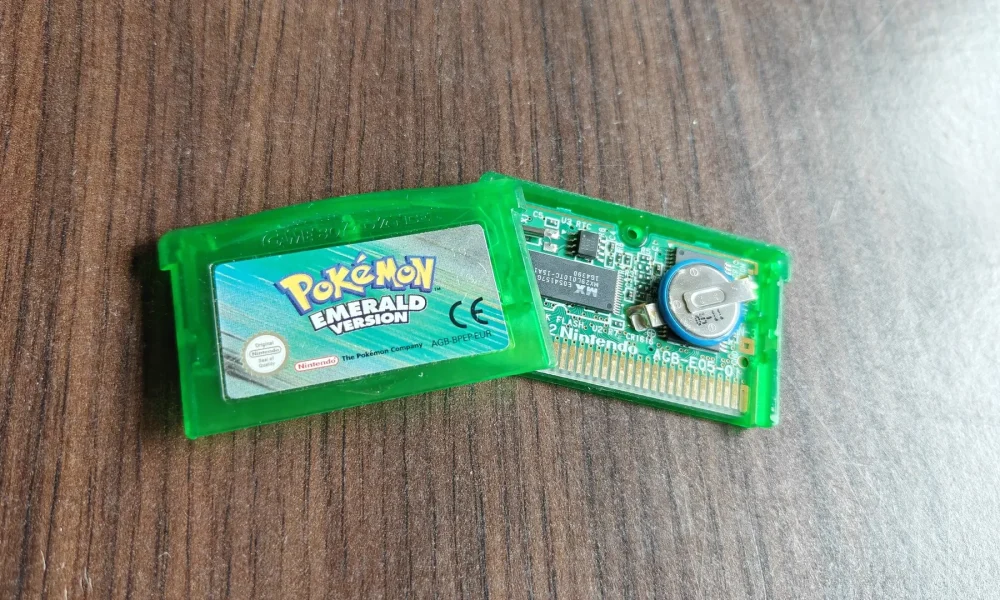
Pokémon Ruby, Sapphire and Emerald are once again a different case. They have one battery, a CR1616, and it only powers the clock. The backup is in flash. When the cell dies, the game says so on startup and the words are in the game’s own code: “The internal battery is exhausted. The game can be played. However, clock-based events will no longer occur.” The berries stop growing and the tide in Shoal Cave stops moving. The backup is intact. FireRed and LeafGreen dropped the clock, and the cell left with it.

Caption: A European Pokémon Emerald, label AGB-BPEP-EUR, on Nintendo’s AGB-E05 card. The clock is the small eight-pin chip marked S3511 next to the cell, at the position marked U3 RTC. The backup is in the separate Macronix MX29L010 flash chip on the left, at the position marked FLASH U2. The cell powers the clock and nothing else.
The backup I lost on a cartridge that couldn’t lose it
Years ago I was playing Pokémon Ruby when the save file became corrupted. I had 39 hours on this file. The standard explanation for a lost save on an old cartridge is the battery, and Ruby even has this line in its own code: When a save fails and the game cannot repair its save memory, the screen indicates that the save memory is damaged or the internal battery is exhausted.
On a real Ruby this can’t be right. The cell has no connection to the backup and Flash keeps its data with the dead or missing cell. So what ate up my 39 hours was one of three other things: a flash worn out from too many writes, a backup interrupted midway by a crash or a cartridge pushed into its slot, or a counterfeit. A bootleg Pokémon cartridge can be saved in SRAM behind a cheap cell instead of flash, and on one of these the battery can really take the save with it. I still don’t know which one of them it was.
What to check before buying
Look for the backup type, not the age. For an N64 or Game Boy Advance game, a search on the title plus “save type” fixes it in a minute, and EEPROM or flash means there’s nothing to replace.
On a SRAM cartridge, ask if the cell was replaced and when, and keep in mind that the swap normally takes the old backup with it. On a Game Boy or Game Boy Advance cartridge, a regular Phillips screw in which the factory used a 3.8mm security screw (Game Boy and Game Boy Color) or a tri-wing screw (Game Boy Advance) means that someone has been inside or that it is not original. This is a strong sign, not proof, and a replaced cell is good news for a buyer, so ask about the screw instead of shying away from it.
And if an EEPROM or flash game has lost its backup, clean the contacts first. There is no cell inside to check.
Sources
Bread Documents, MBC3:
Mupen64Plus backup type database (mupen64plus.ini):
pre-decompilations of Pokémon Emerald and Ruby, src/strings.c and src/save_failed_screen.c: and
GBATEK, GBA and real-time clock cartridge backup support:
FlashGBX cartridge database, db_AGB.json:
Bulbapédia, Pokémon Ruby and Sapphire versions:
Nostos, Pokémon Crystal RTC battery guide:
GBAtemp, fake Pokémon GBA cartridges and their SRAM backups:
Emilio short RetroSoulsBornea Dutch online store for retro games and consoles. He buys, tests and evaluates each cartridge himself.